How to turn the Galaxy XCover Pro off

There are two ways to switch off the Galaxy XCover Pro: via the Quick Panel or using the buttons on the device.
Using the Quick Panel
1
Swipe down from the top of the screen to reveal the Quick Panel.
2
Tap the Power icon.
![The Power icon is located in the Quick Panel]()

3
Tap "Power off", and again to confirm.
![Power icon]()

Using the hard keys
1
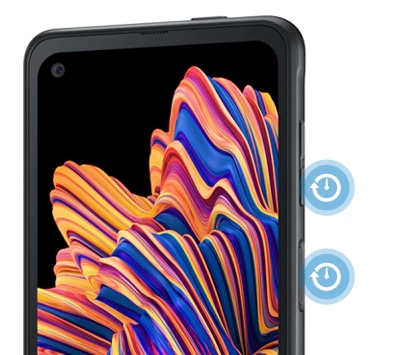
Press and hold the Side key and the Volume Down key simultaneously.
![The Side key and Volume Down key are located on the right hand side of the Galaxy XCover Pro]()
2
Tap "Power off", and again to confirm.
![Tap Power off to switch off the Galaxy XCover Pro]()

3
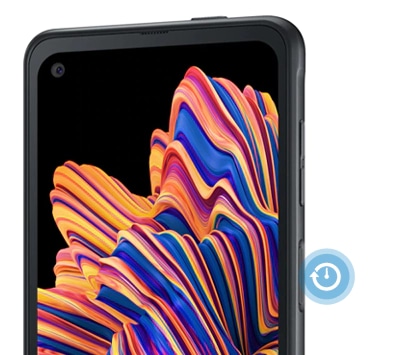
To turn the Galaxy XCover Pro back on, press and hold the Side key.
![The Side key is located on the right hand size the Galaxy XCover Pro]()
Thank you for your feedback!
Please answer all questions.
*Operates as a price discount: Pre-order the Galaxy S26 Ultra larger storage variant (512GB) by 10.03.26 and pay the future price of the Galaxy S26 Ultra smaller storage variant (256GB). Pre-order the Galaxy S26+ larger storage variant (512GB) by 10.03.26 and pay the same price as the Galaxy S26+ smaller storage variant (256GB). Pre-order the Galaxy S26 larger storage variant (512GB) by 10.03.26 and pay the future price of the Galaxy S26 smaller storage variant (256GB).