How to make the screen light up for incoming WhatsApp calls on the Galaxy S8
If you have Edge Lighting notifications activated, the Galaxy S8 screen will not light up when you receive an incoming WhatsApp call.
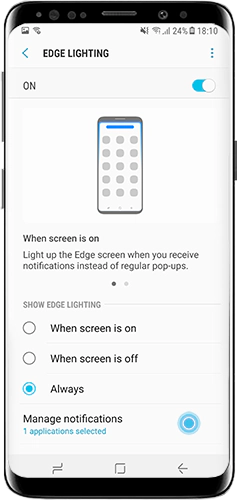
To make the screen light up when you receive an incoming WhatsApp call on the Galaxy S8, you need to either deactivate Edge Lighting or deactivate Edge Lighting notifications for WhatsApp.


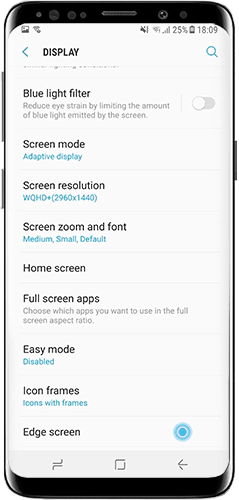
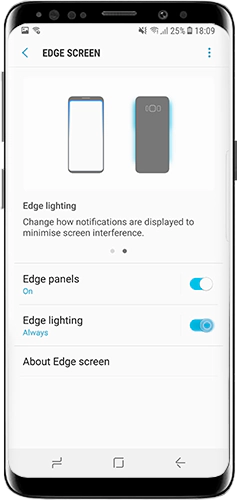
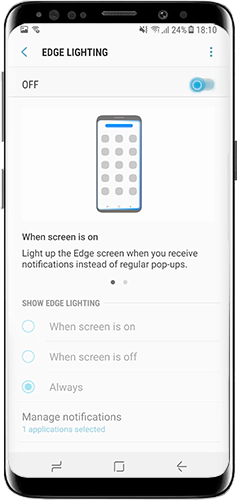
Tap the switch to deactivate Edge lighting.
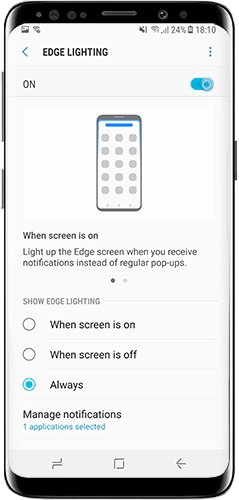
Thank you for your feedback!
Please answer all questions.
*Operates as a price discount: Pre-order the Galaxy S26 Ultra larger storage variant (512GB) by 10.03.26 and pay the future price of the Galaxy S26 Ultra smaller storage variant (256GB). Pre-order the Galaxy S26+ larger storage variant (512GB) by 10.03.26 and pay the same price as the Galaxy S26+ smaller storage variant (256GB). Pre-order the Galaxy S26 larger storage variant (512GB) by 10.03.26 and pay the future price of the Galaxy S26 smaller storage variant (256GB).