How to add an Outlook calendar to the Calendar app
If you are having trouble adding your Outlook calendar to the Samsung calendar app, you can try syncing your Outlook calendar with your Google calendar, then syncing your Google calendar with the Samsung calendar app.
In order to sync your Outlook calendar with your Google calendar you will first need to copy its ICS address. Follow the steps below to find out how:

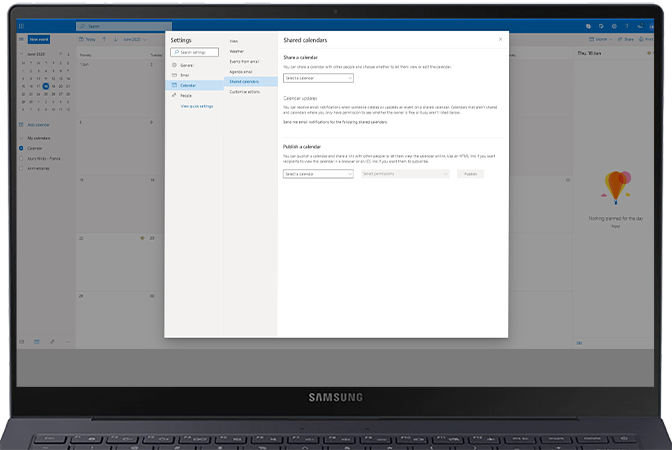

Once you have copied the link, follow the steps in the next section to add it to your Google calendar.
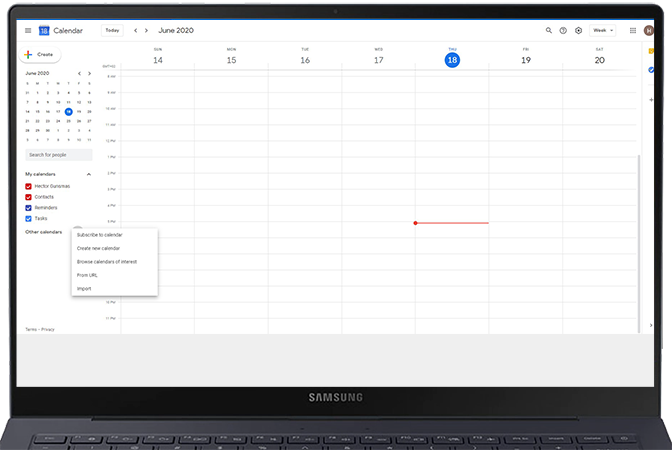
Once you have added your Outlook calendar to your Google calendar, follow the steps in the final section to sync this with the Samsung calendar app.


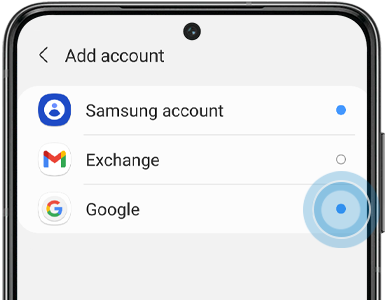
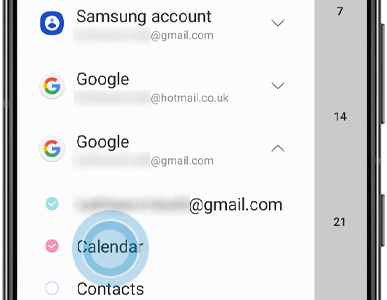
Please note: Events from your Google calendar will usually show in a different colour.
For further assistance find out how to use the Samsung Calendar app.
Thank you for your feedback!
Please answer all questions.
*Operates as a price discount: Pre-order the Galaxy S26 Ultra larger storage variant (512GB) by 10.03.26 and pay the future price of the Galaxy S26 Ultra smaller storage variant (256GB). Pre-order the Galaxy S26+ larger storage variant (512GB) by 10.03.26 and pay the same price as the Galaxy S26+ smaller storage variant (256GB). Pre-order the Galaxy S26 larger storage variant (512GB) by 10.03.26 and pay the future price of the Galaxy S26 smaller storage variant (256GB).